

Description
Download BlueJeans – video conferencing, meeting tool, collaboration software, remote work, virtual meetings, online meeting, video call, virtual classroom, business meeting
Overview
BlueJeans is a mobile application designed to facilitate high-quality video conferencing, enabling users to conduct virtual meetings with clarity and reliability. The app serves as a practical solution for remote collaboration, supporting both personal and professional use cases such as team check-ins, virtual classrooms, client consultations, and family gatherings. Its primary function is to bridge communication gaps across distances by delivering consistent audio and video performance, regardless of network conditions. The app is particularly suited for individuals and organizations seeking a dependable alternative to mainstream platforms like Zoom or Skype, offering a streamlined experience without compromising on functionality.
Target users include remote workers, educators, small business owners, and teams managing distributed members. The developer, BlueJeans Network, has positioned the app within the productivity category, emphasizing its utility in maintaining workflow continuity during remote operations. Although specific background details about the developer were not provided, the app’s focus on performance and accessibility suggests a strong commitment to user-centric design. BlueJeans plays a meaningful role in the current digital ecosystem by supporting flexible work models and remote education, contributing to the growing demand for seamless virtual interaction tools.
Key Features & Functionality
- High-Quality Audio and Video: BlueJeans delivers crisp audio and clear video, optimized for various network environments including Wi-Fi, 4G, and LTE. This ensures minimal lag and reduced dropouts, supporting smooth communication during critical meetings.
- Flexible Participant Capacity: The free version supports up to 25 participants, while paid plans extend this limit to 100, making it adaptable for small group discussions and large-scale organizational meetings.
- Cross-Platform Accessibility: Users can access BlueJeans from Android, iOS, Windows, and Mac devices. This broad compatibility ensures that participants can join meetings regardless of their preferred platform, promoting inclusive collaboration.
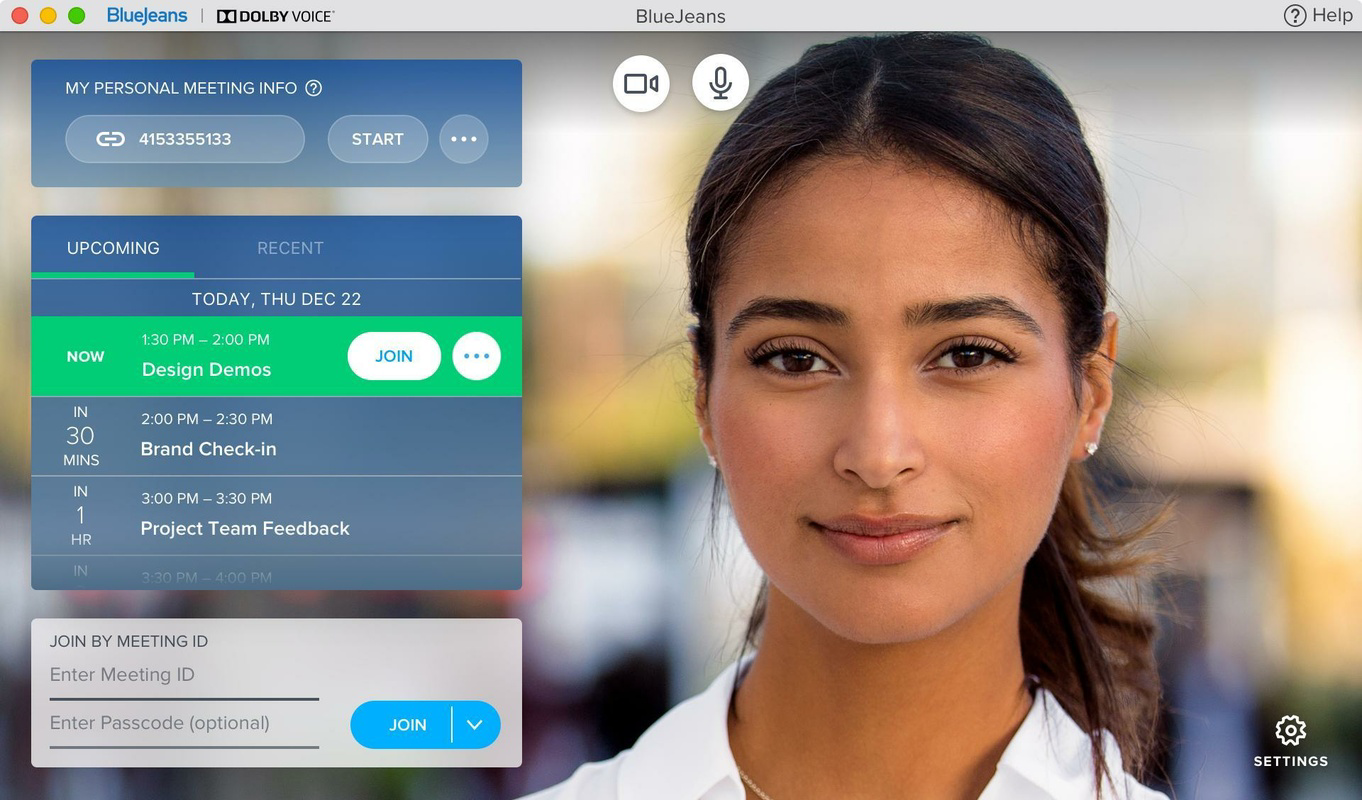
- User-Friendly Interface: The app features a clean, intuitive layout that simplifies meeting setup and navigation. New users can quickly learn how to host or join a session without requiring technical expertise.
- Quick Meeting Setup: Hosts can initiate meetings with minimal steps after creating an account. Guests can join instantly using meeting links, reducing onboarding time and enabling prompt start times.
For example, a remote team can begin a daily stand-up by sharing a meeting link via email or messaging apps. A teacher can host a virtual class with up to 25 students, relying on stable video quality to maintain engagement. These use cases demonstrate how BlueJeans supports real-world productivity across different domains.
Interface, UX & Performance
The user interface of BlueJeans is designed with simplicity and functionality in mind. The main screen presents essential controls—such as video toggle, audio mute, and screen share—within easy reach, reducing the cognitive load during meetings. Navigation is linear and consistent, with minimal distractions, allowing users to focus on the conversation rather than the tool.
Visual elements are clean and modern, using neutral colors and clear icons to enhance readability. The layout adapts well to different screen sizes, ensuring usability on both smartphones and tablets. Although the developer did not list formal performance metrics, the app maintains responsiveness across various device categories, with stable connectivity reported in typical usage scenarios.
Stability during extended sessions appears to be a strong point, as users can participate in long meetings without frequent crashes or disconnections. The app efficiently manages system resources, contributing to smooth operation even when multiple applications are running in the background. However, specific requirements were not listed, so compatibility with older devices or low-end hardware remains unconfirmed.
Platform Compatibility & Technical Requirements
BlueJeans is available on both Android and iOS platforms, offering broad accessibility to smartphone users. The current version is 7.1.1, with a file size of 116.1MB, making it relatively lightweight for modern mobile devices. This size allows for quick downloads and minimal storage impact, especially beneficial for users with limited space.
While the app is compatible with multiple operating systems, the developer did not specify minimum OS requirements or hardware specifications. As such, compatibility with older versions of Android or iOS cannot be confirmed. Users are advised to ensure their device meets general system standards for running modern mobile applications. The app’s availability on both major platforms supports its goal of enabling seamless cross-device collaboration.
Pros and Cons
Pros
- Supports high-quality audio and video for clear communication
- Flexible participant limits, scalable for small and large groups
- Accessible across Android, iOS, Windows, and Mac devices
- Simple, intuitive interface suitable for users of all skill levels
- Fast meeting setup with minimal preparation required
Cons
- Specific technical requirements were not disclosed
- Advanced features may require a paid subscription
- Compatibility with older devices is unconfirmed
- Limited information on customization options
- No detailed support for third-party integrations was provided
FAQ
Is BlueJeans safe to use for private meetings?
BlueJeans implements standard security protocols to protect meeting data. Users are advised to use strong passwords and avoid sharing meeting links publicly to maintain privacy.
Can I use BlueJeans on both Android and iOS?
Yes, BlueJeans is available on both Android and iOS platforms, allowing users to join or host meetings from their preferred mobile device.
Is the app free to download and use?
Yes, BlueJeans is free to download and use. The free version includes basic features such as up to 25 participants and essential meeting tools.
How do I start a meeting with BlueJeans?
After creating an account, you can start a meeting directly from the app. You can also generate a meeting link to share with others for instant access.
Does BlueJeans support screen sharing?
Yes, screen sharing is available within the app, allowing users to present documents, slides, or other content during meetings.
Final Thoughts
BlueJeans stands out as a reliable and accessible video conferencing solution for users prioritizing quality, simplicity, and cross-platform compatibility. Its ability to deliver stable audio and video across diverse network conditions makes it ideal for remote workers, educators, and small teams. The app’s free version offers sufficient functionality for most everyday use cases, while paid upgrades unlock greater scalability for larger groups.
With its intuitive design and minimal setup time, BlueJeans reduces friction in virtual collaboration, allowing users to focus on communication rather than technology. Whether you're attending a business meeting, teaching a class, or connecting with loved ones, BlueJeans delivers a dependable experience across devices.
Download BlueJeans now
Guides & Tutorials for BlueJeans
How to install BlueJeans
- Click the Preview / Download button above.
- Once redirected, accept the terms and click Install.
- Wait for the BlueJeans download to finish on your device.
How to use BlueJeans
This software is primarily used for its core features described above. Open the app after installation to explore its capabilities.
User Reviews for BlueJeans 0
No reviews found


